Quick Summary
HubSpot Service Hub helps small retailers simplify customer support by bringing every conversation from email, chat, social, and orders into one unified system. With built-in CRM, automation, chatbots, and a powerful knowledge base, retailers can respond faster, personalize support, reduce ticket volume, and scale service without increasing headcount. The result is better customer experiences, higher loyalty, and smarter, data-driven decisions – all at a cost that grows with the business.
Introduction
Running a small retail business in the US is more competitive than ever. Many store owners face high expectations from customers. Recent data shows that 32% of customers will walk away from a brand they love after just one bad experience. This presents a narrow margin for error.
Many shop owners struggle with too many open tabs. They switch between Instagram DMs, Gmail, and Shopify notifications just to answer a simple “Where is my order?” message. This scattered method kills momentum and hampers customer service.
HubSpot Service Hub changes the game. It does more than tidy your inbox – it brings your entire operation into one clear view. With real-time links to the Smart CRM, you immediately see who is emailing, what was purchased recently, and each customer’s lifetime value. This integration supports digital marketing and customer relationship management efforts with striking ease.
In this guide, we break down how the tool helps US-based retailers automate busy work and boost customer satisfaction. Read on for a detailed roadmap that turns a chaotic inbox into a growth engine.
Understanding HubSpot Service Hub
Imagine HubSpot Service Hub as a digital store manager who remembers every customer. This complete help desk solution sits on top of the HubSpot Smart CRM so that all support tools link directly with sales and marketing data.
Small retailers gain a crucial edge from this integration. When a customer emails about a broken item, a support agent sees that the same person spent $500 on Black Friday. This context leads to a personalized response that a standalone ticketing system may miss.
The platform combines a ticketing system, a customer portal, and a knowledge base in one neat dashboard. Retailers can use the ticketing system to keep every request in view. For example, if a return request comes through Facebook Messenger, it becomes a tracked ticket with a set due date. This setup boosts service effectiveness and complements marketing automation strategies.
Centralizing Customer Conversations
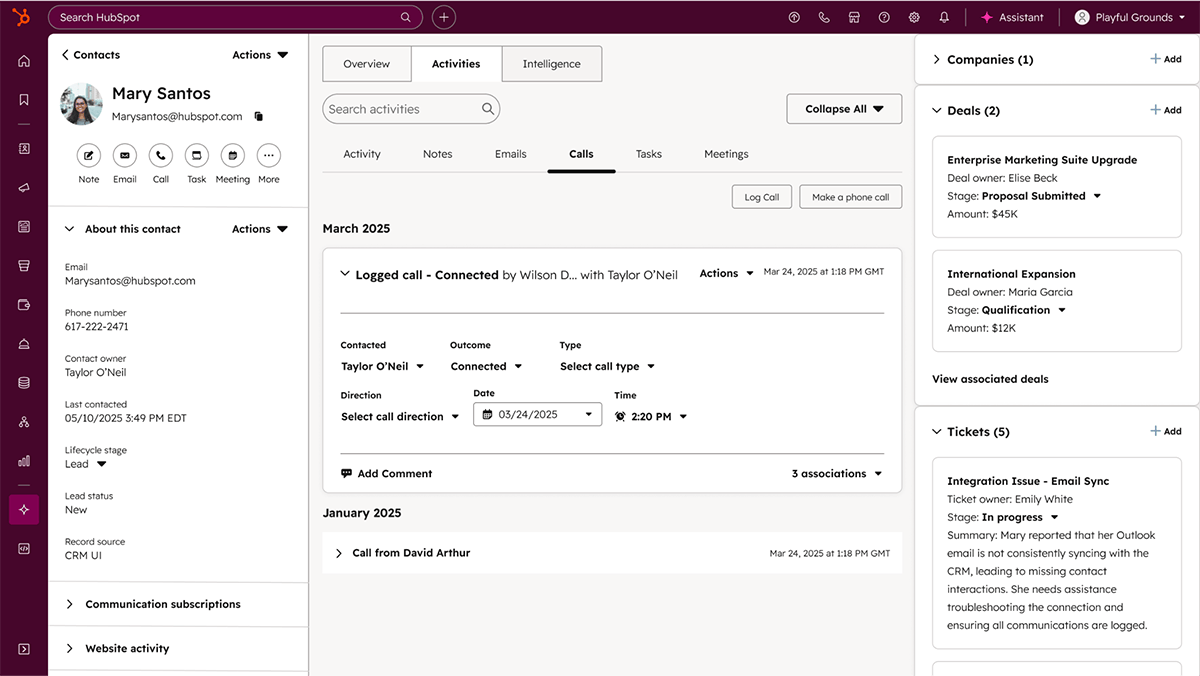
US consumers now use three to four channels to contact a business. They might send an email on Monday, share a tweet on Tuesday, and chat on Friday. An organized system ties all these threads together. HubSpot’s shared inbox treats every interaction as part of one conversation, which strengthens customer experience.
Teams track inquiries in real time. Agents enjoy a complete 360-degree view of every client. They quickly learn if a person is a new visitor or a loyal customer. This clarity supports smooth lead nurturing and effective customer support.
Building a Knowledge Base That Works
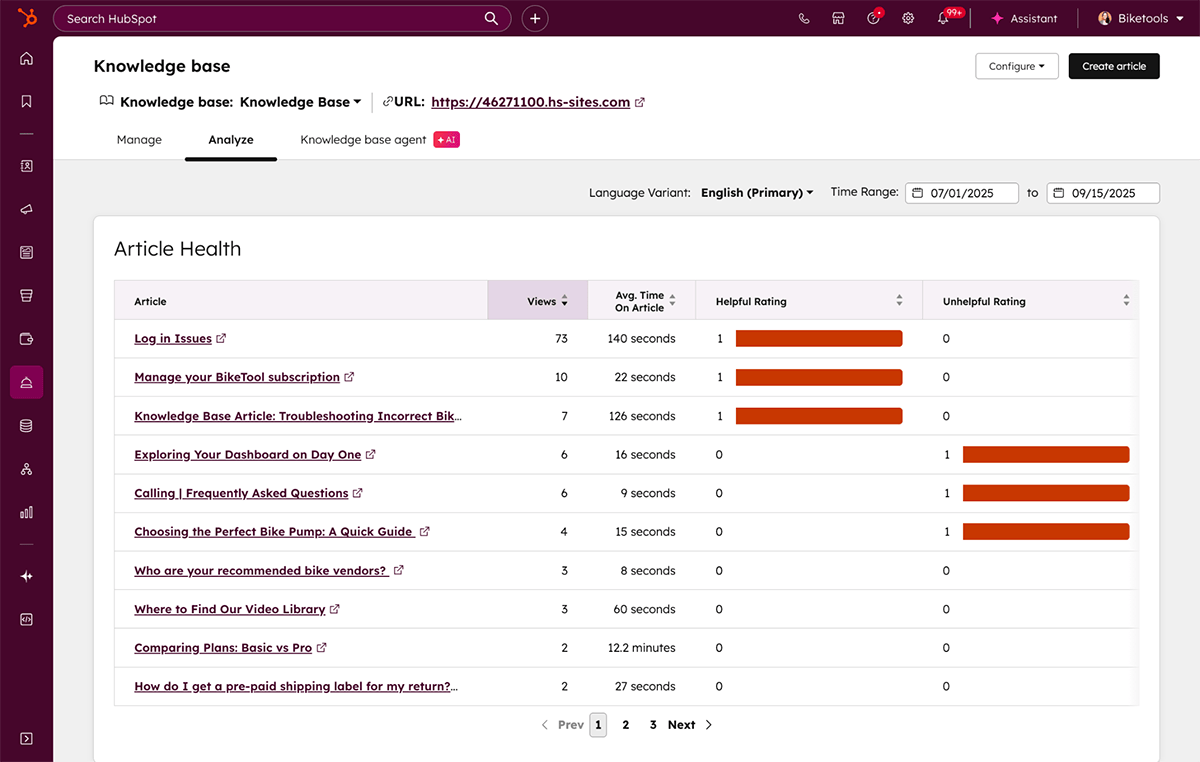
Create a resource that answers your customers’ common questions. A study found that 81% of customers try to resolve issues on their own before reaching out to support. HubSpot Service Hub makes it easy to build a professional knowledge base that meets this demand.
- Capacity for Growth: Retailers with Service Hub Professional accounts can publish up to 2,000 articles. Enterprise accounts handle up to 25 different knowledge bases, totaling 10,000 articles.
- SEO Benefits: These articles get indexed by Google. A clear “Size Guide” or “Care Instructions” page can drive new organic traffic while serving existing customers.
- Self-Service Success: Support teams write and publish articles with simple permissions. Shoppers quickly find information on returns, payment methods, or product details without delay.
- Deflection Power: Publishing FAQs greatly lowers ticket volume. If a customer starts typing “return” in the chat widget, the bot can offer the “Returns Policy” article instantly.
- Control Access: Visibility settings let you manage who sees what. Public guides serve general shoppers while restricted pages handle wholesale or B2B queries.
- Scheduled Updates: Management tools let you schedule articles for future release. Write your “Holiday Shipping Deadlines” guide and have it go live on November 1st.
- Feedback Loops: Feedback buttons let customers rate each article. A low rating on your “How to Assemble” guide signals that it needs improvement.
- HubSpot CRM Integration: Insert knowledge base articles directly into emails. With one click, your agent can share a helpful link in a reply.
- Easy Editing: Team members update articles using a simple drag-and-drop editor. This facility is crucial when product details change quickly.
- Smart Analytics: Analytics track which search terms return no results. When customers search for “Gift Wrapping” and find nothing, you know what article to write next.
Automation That Saves Time and Money
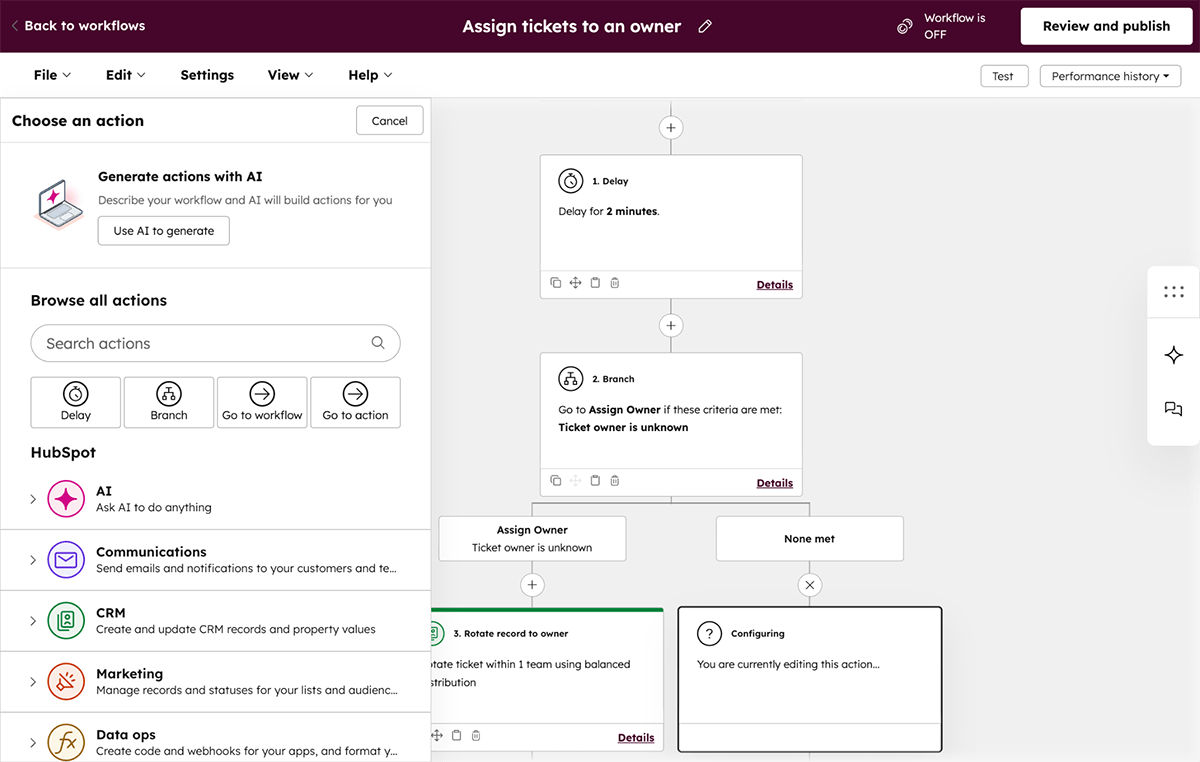
Small teams rely on automation to deliver efficient customer service on a tight budget. HubSpot Service Hub uses AI to quickly route tickets to the right person. This approach prevents issues from lingering in a generic “info@” inbox for days.
Tasks get automated in a smart way. For example, if a ticket sits for two days, the system flags it as “High Priority” and alerts the owner. Such workflow automation supports data-driven decisions in customer management.
Chatbots serve as 24/7 sales associates. They answer simple questions like “What are your hours?” or “Do you ship to Canada?” without needing human intervention. They even help qualify leads by asking if a customer seeks a return or a new purchase. This smart setup enhances customer engagement and streamlines support.
Follow-up emails, satisfaction surveys, and task reminders run in the background. These elements let you handle customer support and email marketing without extra effort.
Managing Customer Feedback Effectively
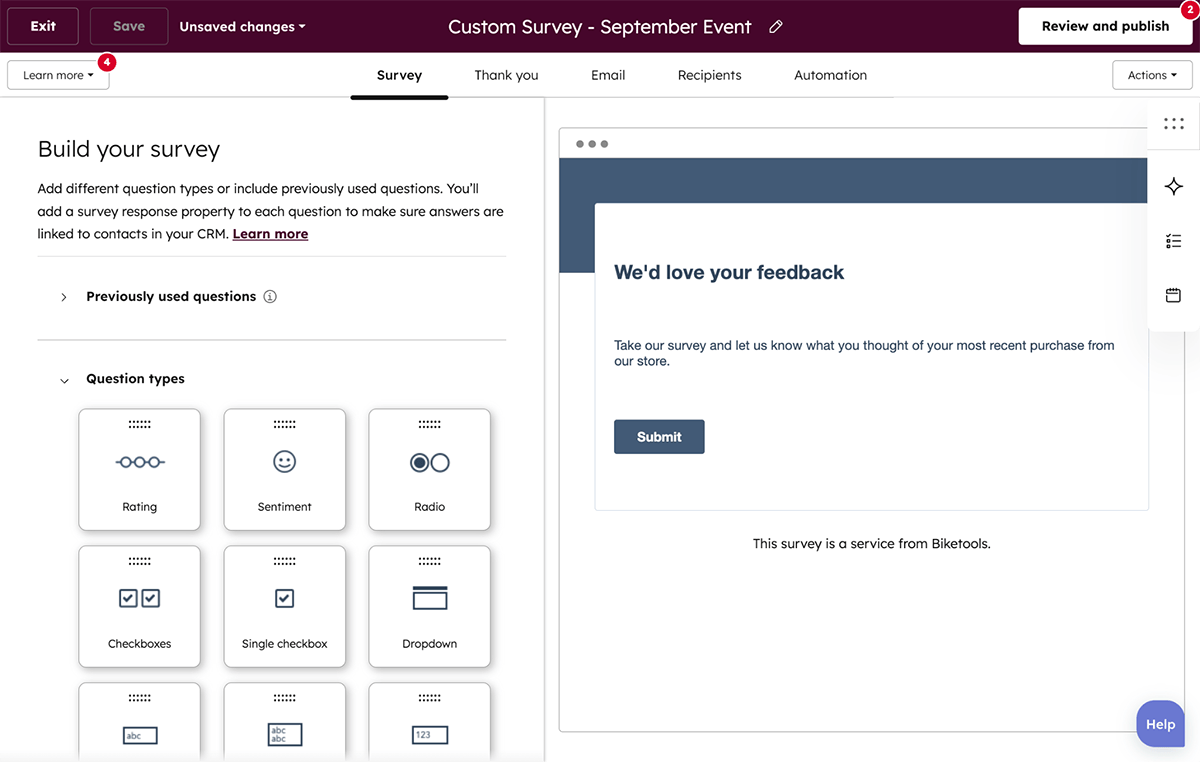
A few simple metrics help reveal areas for improvement. Small businesses collect customer feedback using email marketing and live chat. HubSpot Service Hub automatically categorizes this data.
| Survey Type | Best Use Case for Retailers | The “So What?” |
| CSAT (Customer Satisfaction) | Sent immediately after a ticket is closed. | Tells you if your support agent was helpful right away. |
| NPS (Net Promoter Score) | Sent quarterly or after a major purchase. | Measures long-term loyalty and the likelihood to refer friends. |
| CES (Customer Effort Score) | Sent after a return or checkout process. | Shows if your processes are too hard or cause too much friction. |
Teams use live chat and email marketing to gather real-time insight. Sentiment analysis spots trends in customer comments. Agents get alerts if words like “frustrated” or “late” appear more often.
Staff act quickly when scores drop. A low score from a VIP customer can trigger a workflow that creates a call task. Such prompt measures boost customer satisfaction and loyalty.
Tracking Customer Issues from Start to Finish
The ticketing system creates a permanent record for every request. A ticket shows its status – New, Waiting on Customer, or Closed – in plain view for the team. Workflow automation escalates urgent requests. For example, a ticket from a customer with a “Lifetime Value > $1,000” can automatically be marked as urgent.
Collaboration features let agents tag colleagues on a ticket. A private note like “@Sarah, did we ship this yet?” aids internal coordination. Service Level Agreements (SLAs) help keep response times in check. Visual timers remind agents to answer chats and emails promptly. Tracking tools monitor an issue from start to finish. Noticing a refund drag from Monday to Friday reveals bottlenecks.
Users have reported a 70% improvement in efficiency when managing customer issues with unified tools. Better ticket management leads to higher customer retention. Organized and prompt service builds strong customer relationships. Clear tracking can flag product defects. A spike in “Zipper Broken” tickets warns that a product might need to be pulled from shelves.
Integration with HubSpot CRM gives a full view of customer interactions. Agents see current orders and pending issues side by side. The Starter and Professional plans suit retailers looking for effective issue tracking without the high cost of enterprise software.
Reporting and Analytics for Better Decision Making
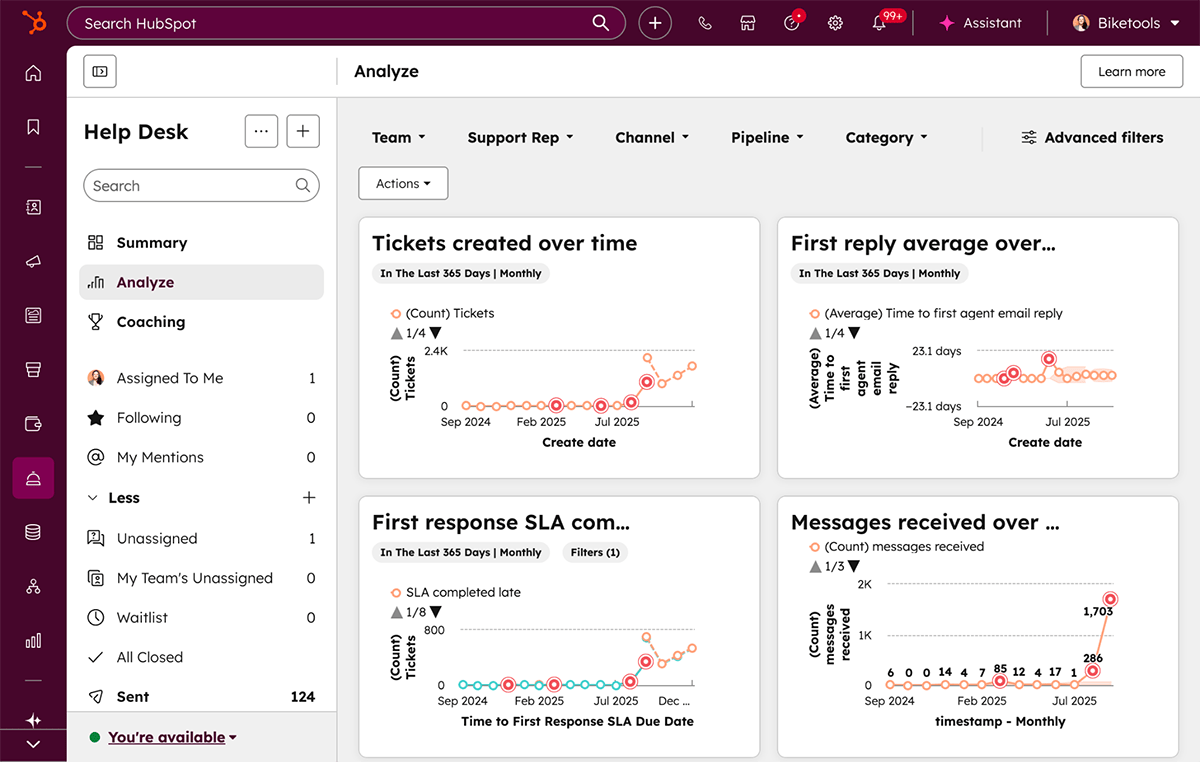
HubSpot Service Hub offers clean dashboards that show ticket volumes, response rates, and customer satisfaction scores. Managers can build reports to answer specific business questions.
“Which day of the week is busiest for support?” helps plan staffing. “Which product category generates the most complaints?” guides quality improvements.
Service analytics powered by AI let you track how quickly each rep closes tickets compared to team averages. Users value these insights for making data-driven decisions.
If “First Response Time” drifts from 2 hours to 6, the dashboard alerts you immediately. This enables quick action to boost the customer journey.
Scaling Your Support as Your Retail Business Grows
Many small businesses make the error of choosing software that does not grow with them. HubSpot Service Hub scales in a way that fits your needs. Start small with free tools to manage day-to-day queries.
When conversation volume increases, you can upgrade to the Starter plan (around $15–$20 per seat, per month). This step adds useful workflow automation that handles repetitive tasks. Later, the Professional plan unlocks the full power of the knowledge base and customer portal. Megaworld Lifestyle Malls boosted support efficiency by 3.5 times during busy periods using these scalable tools.
Department teams can use advanced analytics and smart routing to keep service personnel even as traffic grows. This setup fosters customer engagement without extra headcount.
Integration with Other Business Tools
Your help desk works best when it connects with other software. HubSpot Service Hub partners with more than 500 popular applications. For US retailers, the Shopify integration stands out by syncing customers, products, and orders. This way, you never have to ask, “What is your order number?” again.
Other important integrations include:
- Google Search Console: It tracks which support articles rank on Google, boosting SEO performance.
- Facebook Messenger: It offers instant customer support directly from your business page.
- Zapier: It connects Service Hub to thousands of tools, such as sending a Slack alert for an urgent ticket.
- WordPress: It captures leads and tickets directly from your retail site or blog.
- Microsoft Teams: It enhances project management with live collaboration on service tickets.
HubSpot Academy provides clear guides for setting these integrations up, making it easier to harness operations hub features.
Cost Considerations for Small Retailers
Cost matters for small businesses choosing customer service software. HubSpot offers a clear pricing model, unlike many competitors that charge for extra features. The pricing structure supports solid customer management and marketing automation.
| Plan Level | Estimated Cost (2025) | Best For |
| Free Tier | $0/month (Up to 2 users) | Startups & Solo Founders. It includes a shared inbox, basic ticketing, live chat, and the full CRM. |
| Starter Plan | ~$10 – $20 per seat/month | Growing Shops. It adds simple automation, removes HubSpot branding, and offers multiple ticket pipelines (e.g., Returns vs. Support). |
| Professional Plan | ~$90 – $100 per seat/month | Established Retailers. This plan unlocks a full knowledge base, customer portal, detailed reporting, and customer feedback surveys (NPS). |
| Enterprise Plan | ~$150 per seat/month | Multi-Store Chains. Ideal for teams needing advanced permissions, goal tracking, and sandbox environments. |
An extra cost to consider is that third-party apps may have their own subscription fees. Still, reduced labor costs usually cover the price of the software within a few months.
Comparisons with tools like Zendesk or Freshdesk show that lower teaser rates can hide gated features. HubSpot’s inclusion of the CRM at no extra charge offers strong value for customer management and marketing strategies.
Success Stories from Small Retailers
Success leaves clear hints. Megaworld Lifestyle Malls faced a 3.5x surge in customer inquiries yet maintained high service levels with HubSpot Service Hub. Their effective use of workflow automation and the ticketing system sets them apart.
Morehouse College boosted engagement by 30% using the reporting tools. Although they serve education, their method applies to retail. Small businesses see improved retention and reduced churn with smart customer support practices.
These examples show that enterprise-grade service is achievable on a tight budget. Task management features and well-integrated systems build long-term customer loyalty.
Conclusion

HubSpot Service Hub gives small retailers the tools to centralize customer conversations, set up workflow automation, and track every support issue with ease. It shifts teams from scrambling in a busy inbox to building lasting customer relationships. This guide breaks down clear features like a shared ticketing system and an interactive knowledge base that boost customer support and marketing automation.
Teams can boost efficiency by using a well-organized knowledge base and clear dashboards for data-driven decisions. Integrations with Google Search Console and Facebook Messenger keep everything in one place. This framework helps support smooth customer engagement and builds loyalty over time.
Every detail in this guide comes from careful research using trusted studies, case reports, and industry surveys. The information was collected by experts in customer service, email marketing, and digital marketing strategies.


