Quick Summary
TeraBox AI Video Generator is a fast, beginner-friendly tool that turns static photos into animated videos in seconds, making it ideal for casual users, creators, and small businesses. It stands out with its completely free offering, including 1TB of cloud storage, no watermarks, high-resolution output, and a wide range of templates. The platform requires no technical skills – users upload images, select a style, and generate videos instantly across web, mobile, or desktop.
While it lacks advanced cinematic controls, text-to-video features, and deep customization found in premium tools, TeraBox prioritizes speed, simplicity, and accessibility. Compared to costly alternatives, it delivers exceptional value by enabling users to create professional-looking videos quickly and for free, making it a practical choice for everyday content creation.
Introduction
Do you ever want to turn a gorgeous picture into a mini-movie but don’t have the time, money, or ability to do so? That’s what the TeraBox AI video generator has been specifically created for! TeraBox is not just a photo-to-video creator, but also provides an incredibly robust AI Assistant included with 1 TB of free cloud storage, which makes it available for anyone, from casual users all the way through to small business owners!
TeraBox AI Video Generator converts stationery photos or pictures into animated videos in seconds. You can do it for free with a simple user interface, but more significantly, you’ll be amazed at the results of your images or posters being transformed into videos (animated). In this review, we’ll look at TeraBox AI’s core features, pricing, pros and cons, and how it compares to other AI video software. We hope that after reading this review, you will have a clearer understanding of TeraBox AI and why we think it’s one of the most practical options for most creators in 2026.
Features of TeraBox AI Video Generator
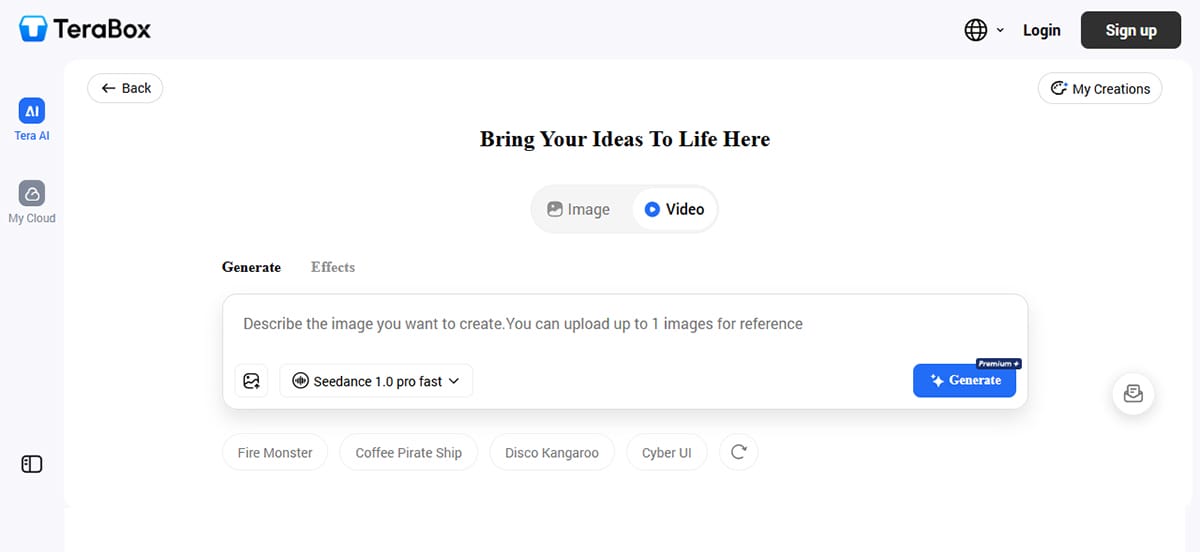
TeraBox AI Video Generator offers an impressive array of features that deliver high-quality output, fast processing, ease of use, and seamless cloud storage integration.
AI-Powered Photo-to-Video Conversion
The main function of TeraBox’s AI is its ability to create animated videos from still images uploaded by the user, either directly from the user’s device or from a TeraBox cloud location. The user chooses an animation style and then presses the “generate” button. The AI will create animations that replicate camera or subject movement, creating a cinematic landscape, a living memory from a portrait, or an engaging advertisement from a product photo.
Blazing-Fast Generation Speed
Speed is one of the most spoken about characteristics of TeraBox. For instance, many other AI-powered video editing/production applications can take 30 minutes or more to render a single clip; however, TeraBox usually renders a finished, edited/produced video in just a few seconds (typically under 30). This means content creators can work with multiple styles and/or templates without long wait times.
No Watermark – A Huge Advantage
The vast majority of free AI video software adds a ‘free’ watermark to every video it creates. On the other hand, TeraBox produces completely clean and watermark-free videos. This provides a tremendous advantage to anyone who plans to use the video on social media, show their work to clients, or use it for presentations, since it makes the video appear to have been used for those purposes without a visible watermark.
Rich Template Library
A range of AI templates is available for use in various purposes, including anime-style effects, romantic transitions, cinematic filters, and seasonal decorations. You can find the right mood for any occasion – whether it’s a nostalgia-inducing slideshow, a high-energy product promotional video, or a peaceful outdoor montage – all by using templates designed specifically to create those moods.
Multi-Image Upload & High-Resolution Output
You no longer need to limit yourself to one photo at a time! You can combine an unlimited number of images into a single, seamless, edited video – perfect for print photo albums, event recaps, or product showcases. All of the videos are created in high resolution, meaning they will look crystal clear on social networks, websites, or up on a 16-foot TV screen.
Integration with 1TB Free Cloud Storage
TeraBox is unlike any other AI video maker on the market because you get 1 TB (i.e., 1,024 GB) of free cloud storage when you sign up for an account. TeraBox lets you back up all your pictures and videos in one place, access them via either mobile, web, or desktop, and create new AI videos from your stored files, all in one app. This integrated ecosystem allows you to avoid managing multiple tools for your projects and alleviates concerns about losing your original media files.
Cross-Platform Availability
TeraBox allows users access via iOS, Android, and the web. They can begin editing on their phones, switch to their computers, and download the finished video whenever they wish, making it ideal for busy creators.
Pricing of TeraBox AI

TeraBox offers one of the most generous free plans in both cloud storage and AI video generation.
Free tier (1TB Storage) — You don’t need a credit card to use it. With your free plan, you get 1024GB of cloud storage with unlimited photo uploads (millions of them), and access to our AI-generated video creation tool and all of the templates, with no watermarks or limits on the number of video designs. The free tier allows you to upload, store, and create with multiple high-resolution images and files, which is adequate for most casual users and small-scale creators.
If you’d like your premium plan, you can easily upgrade your storage limit to 1 TB or access other premium features (advanced editing tools), faster processing times, or better-quality downloaded content for an additional monthly cost (this can vary by region). TeraBox is a low-cost, easy-to-use cloud storage solution. All pricing is clear and competitive; typically starting around $3/month (depending on region).
Important note: you can do almost everything, including creating up to 1000 professional-looking, watermark-free videos, with NO monthly cost.
Compared to competitors like Runway (12–76/month), Pika Labs (10–35/month), or Kling AI (complex tiered pricing), TeraBox’s free offering is unrivaled.
Pros of TeraBox AI

The advantages of the TeraBox AI Video Generator, as established through the extensive testing and experimentation done, are listed below:
- Free core functions: absolutely no fees, watermarks, or limits on how many videos can be made.
- The speed of video generation is unintentionally remarkable: it can be produced in seconds rather than minutes or hours.
- No technical knowledge is needed: no engineering prompts, timeline editing, or complex setups necessary; upload, pick a style, and generate.
- Without watermarks: they look clean and professional, so that they can be shared anywhere!
- Free Cloud Storage: You can store all your photos & videos in one place and create your AI video formatting right from there.
- Sync Across Devices: You can start editing on your cell phone and finish it on your computer.
- Variety of Templates: For personal, social, ad, and educational purposes.
- High-Res Outputs: Good enough for nearly all online and offline use.
Cons of TeraBox AI

Although TeraBox AI is well-suited for most people, it has not been tailored to replace advanced filmmaking tools. Even though consultation points below are less relevant to the specified users, here are some things to keep in mind:
- Limited advanced features: Unlike Runway (which features 4K resolution, motion brushes, and various artistic style transfers), TeraBox is designed for simplicity and speed rather than professional-level cinematic production. For users seeking Hollywood-level effects, there are separate programs available specifically suited for those specifications. Nevertheless, for 99% of users who want to add life to their photos, that won’t be a real limitation.
- Limited manual control: TeraBox may be too streamlined for advanced users who want precise control over animation intensity, exact camera paths, or frame-by-frame adjustments. However, this ease of use comes at the cost of fewer customization options – no native text-to-video generation. Currently, TeraBox focuses on converting images into videos. Unlike CapCut’s Dreamina and Runway’s Gen-3, you cannot generate a video simply from a text prompt. This feature is scheduled to be added in future updates.
- Account and cloud storage needed: You need to sign up for a TeraBox account and use the cloud system to use the AI generator. Some people prefer a fully offline tool, but 1TB of free storage shouldn’t be a big deal for most.
The weaknesses are less of an issue when viewed in light of the other points listed above. Most home users (including teachers), small business owners, and social network users will find that TeraBox AI meets their needs for a quick, cost-free way to convert photos into videos with minimal issues.
Conclusion

AI video production is growing significantly. Tools such as Runway, Pika Labs, Kling AI, and CapCut provide great capabilities, but they’re also expensive to use monthly (cost $10-$50/monthly), difficult to learn how to use (take 10-20 hours), require long periods of time to render (often exceeds 20-40 minutes), and have extremely obvious watermarks on finished products (i.e., the word “pop” will be clearly displayed within the video). Therefore, for the everyday person who wants to turn their pictures into an interesting movie without spending thousands of dollars or hundreds of hours learning complicated software, TeraBox’s AI Video Generator is a fantastic option.
You’ll get quick, cost-effective project development; uncomplicated creation; and video content generated with clear, professional designs, without any watermarks. In addition, you’ll have an expansive amount of data to store your work (1TB) in the cloud, thus providing you with all the tools needed to compete with other content creators who use paid platforms.
If you wait to bring to life a group of memories in photographic form — family, travel, products, or social media – give the TeraBox AI Video Creator a shot. You may be surprised at what you can put together in seconds for free!


