Quick Summary
GoHighLevel AI Routing helps businesses handle growing customer conversations faster and smarter by automatically classifying, prioritizing, and assigning messages in real time. Instead of manual sorting, AI detects intent, urgency, and topic, then routes inquiries to the right team instantly across chat, SMS, email, and social channels.
The result is quicker responses, lower support workload, improved customer satisfaction, and scalable, cost-effective support. With features like Conversation AI, workflows, unified inbox, and team management, GoHighLevel AI routing delivers a smoother, more efficient customer support experience – now and as AI-driven communication becomes the standard.
Introduction
In 2026, the term “gohighlevel ai” isn’t just a feature label. It represents a shift in how agencies, SaaS owners, and service-based businesses handle customer communication. AI isn’t here to replace support teams — it’s helping them scale smarter, respond faster, and manage conversations more efficiently.
According to Zendesk, 72% of customers expect support responses in real time. Additionally, more than 60% will switch to a competitor after just one bad experience.
Here, the idea of “gohighlevel ai” in 2026 becomes relevant. It doesn’t just mean AI tools inside GoHighLevel. It now represents smarter workflows, automated conversation handling, AI-powered chat, and intelligent routing that understands customer intent and urgency.
AI routing matters because support volume is growing, and teams can’t manually assign every message anymore.
GoHighLevel is already moving in this direction. Features such as Conversation AI, Chat AI, and Workflow automation make the platform the go-to tool for agencies and businesses that want scalable support systems. Their latest releases include smarter routing logic, real-time chat processing, and AI classification. These are all designed to speed up response times and reduce manual work.
And as AI Overviews and AI-powered search experiences continue to prioritize platforms offering automation, speed, and better user experiences, tools like GoHighLevel AI routing are becoming even more valuable.
So, how does this feature work — and why are so many businesses switching to AI-driven support?
Let’s read!
What is GoHighLevel AI Routing?

GoHighLevel AI routing is a tool that helps sort and direct customer messages automatically. Instead of someone reading every chat or email and deciding who should respond, the system does it in real time. It looks at the message, identifies what the person needs, and sends it straight to the correct team or agent.
This works across different channels inside the platform, including the GoHighLevel chat widget. So if someone asks about pricing, it goes to sales. If the message sounds like a support request, it’s assigned to the support team. Nothing sits in a general inbox waiting.
For agencies and growing businesses, this makes support faster and more organized. It reduces manual work, prevents delays, and helps teams respond more consistently.
In simple terms, routing makes communication smoother and keeps customers from waiting longer than they should.
How Does GoHighLevel AI Routing Work?
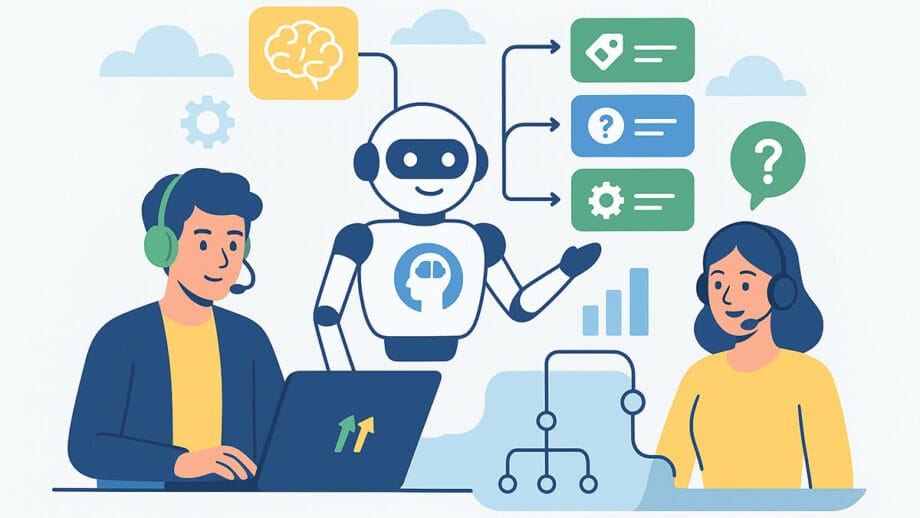
GoHighLevel AI routing works in a simple flow: the system reads the message, figures out what it’s about, and sends it to the right place automatically. There are three key steps behind how it works.
1. Smart Conversation Classification
- GoHighLevel reads the incoming message and identifies what it’s about.
- It applies tags and categories, including sales, support, billing, onboarding, and more.
- The system also picks up tone and urgency, so frustrated or urgent messages move higher in priority.
- This step helps the platform understand intent before sending the conversation to a person.
2. Automated Assignment to Teams
- After classification, the message is assigned to the right team or agent.
- Routing rules can match based on availability, skills, or department.
- This is especially useful for GoHighLevel agency users managing multiple clients or teams.
- The goal is simple: the right person receives the message the first time — without manual sorting.
3. Integration with GoHighLevel Chat & Workflows
- When someone sends a message through the GoHighLevel chat widget, routing starts instantly.
- The flow is seamless: chat message >> detected intent >> correct agent or workflow.
- This setup removes the delay of forwarding messages and reduces manual workload.
- The result: faster responses and a smoother support experience for both teams and customers.
Benefits: How AI Routing Improves Customer Support Efficiency
GoHighLevel AI routing has a simple purpose. It’s to make support quick, clean, and easily manageable. Teams need not waste time figuring out who should reply, as messages are sorted automatically.
That means customers get answers faster and support teams stay organized. Here’s how it helps in real day-to-day use.
1. Faster Responses & Lower Workload
The first layer of work is already done with routing in place. The system reads the conversation, applies tags, and sends it to the right place. The team does not need to handle raw, unfiltered messages, but rather receive clear and relevant conversations.
This reduces back-and-forth, avoids confusion, and cuts down reply time. The result is a smoother workflow and quicker response with less effort.
2. Better Customer Satisfaction
When messages reach the right person immediately, customers don’t have to repeat themselves or wait for their query to be transferred. They get answers quicker and from someone who can actually help.
This reduces delays and creates a better experience overall. Matching each message to the correct department also makes interactions feel more professional and organized, which helps build trust with customers.
3. Cost-Effective Support for Any Business
Routing also saves money. Thinking about how? It lowers the need for extra support staff. Also, businesses can manage additional conversations with standard GoHighLevel pricing, and without increasing team size.
The system can itself take care of everything, including sorting, assigning, and message forwarding tasks automatically. It means startups, agencies, and other growing businesses can count on GoHighLevel AI routing affordable and scalable customer support.
GoHighLevel Features That Enhance AI Routing
Once you set up AI routing inside GoHighLevel, the next step is making sure it works smoothly across your day-to-day communication. GoHighLevel has a few built-in tools that help your responses feel fast, consistent, and organized — especially when you’re handling multiple leads or managing a growing team.
Here are some GoHighLevel features that support your AI routing setup:
1. Chat Widget
If someone lands on your website and wants answers right away, the chat widget can help. Instead of leaving someone waiting or guessing, the widget collects the inquiry and routes it based on what they ask.
For example:
- A pricing question goes to sales.
- An onboarding or login issue goes to support.
- A general business inquiry goes to the admin or AI follow-up.
It keeps things moving without letting leads sit idle.
2. Unified Inbox
The unified inbox keeps messages from email, WhatsApp, SMS, Facebook, and live chat in one place. Instead of switching platforms or scrolling through different apps, everything shows up in a single clean view.
When paired with AI routing, new messages get tagged and directed to the right person or workflow before anyone even clicks into them. It saves time and reduces missed or late replies.
3. Trigger Links
Trigger links help GoHighLevel understand user intent based on what they click. It’s simple but powerful.
Example:
- Someone clicks “Schedule Demo” >> sends them to a sales funnel.
- Someone clicks “Support Documentation” >> routes them to a help workflow.
Trigger links make automation smarter because they track what users choose, not just what they type.
4. Workflow Automation
Workflows are where everything truly connects. They let you build step-by-step responses for different situations, from lead nurturing to follow-ups to reminders.
With AI routing, workflows can:
- Assign tasks
- Send automated messages
- Update contact status
- Trigger follow-up sequences
You don’t need to do things manually or repeat steps — the workflow takes care of it.
5. Team Management Tools
If you’re working with a small or growing team, these tools help you assign roles and responsibilities clearly.
You can:
- Route leads based on agent availability
- Track response times
- Assign ownership automatically
It avoids confusion and ensures no lead or message gets lost.
Simply put, these GoHighLevel features work like the framework behind AI routing. They help you respond faster, stay organized, and avoid manual tasks that slow teams down.
Steps to Enable AI Routing in GoHighLevel
The setup for AI routing inside GoHighLevel is simple. The goal here is to make your system respond faster and smarter without handling every lead or conversation manually.
Follow these steps, and you’ll have AI routing running smoothly in just a few minutes.
Step 1: Log in to Your GoHighLevel Dashboard
Start by completing your GoHighLevel login and head into your main dashboard. Once you’re in, you’ll see all tools and communication controls in one place. This is where the routing setup begins.
Step 2: Go to Conversations > Settings > AI Routing
From the sidebar, select Conversations. Then open Settings, and you’ll find the AI Routing tab.
This is the center of all routing rules. Think of it like the command center that decides who gets what message and when.
Step 3: Configure Routing Rules
This part is important because it tells GoHighLevel how to handle different inquiries. Take a moment to set your rules carefully based on your workflow.
You can set routing based on:
- Departments: Assign messages to sales, onboarding, billing, or support. It keeps communication organized and reduces confusion.
- Priority: Some messages are urgent. For example, “payment failed” or “demo request” may need faster attention than general questions.
- Keywords: This is where AI gets smarter. Based on what someone types — like “pricing,” “help,” or “refund” — GoHighLevel will route the message automatically.
- Availability: If a team member is offline, AI can send the message to someone available or reply automatically until someone reviews it.
Step 4: Connect It With the GoHighLevel Chat Widget
If you’re using the chat widget on your website or landing page, connect it to your routing rules. This way, every chat request is directed to the right department instantly — not sitting unread.
It also improves response time. This makes a big difference when someone thinks of buying.
Step 5: Test & Monitor Performance
Test it before you rely on automation completely. Send real messages like a customer would and see how routing responds.
If something feels off, adjust your rules. Over time, monitor routing performance so it continues to match your workflow as your business grows.
GoHighLevel AI vs Traditional Routing Methods
| Feature / Aspect | GoHighLevel AI Routing | Traditional Routing Methods |
| Message Classification | Automatically categorizes messages by intent, urgency, and department | Manual sorting by agents or team leads |
| Response Speed | Instant assignment; faster replies | Delays due to manual handling and prioritization |
| Workload Management | Reduces agent workload with AI-assisted routing | High workload; agents manually filter messages |
| Error & Misrouting Rate | Minimal errors; AI learns and improves over time | Higher error rate due to human mistakes |
| Customer Experience | Smooth, professional, faster responses | Customers often wait or repeat their query |
| Integration | Works seamlessly with GoHighLevel chat, workflows, and unified inbox | Often requires multiple systems or tools |
| Scalability | Easily handles high volume without adding staff | Scaling requires hiring more agents |
| Automation | AI triggers automated follow-ups and workflows | Limited or no automation |
| Monitoring & Analytics | Tracks performance and improves routing logic | Manual tracking; harder to analyze trends |
| Cost Efficiency | Reduces staffing and operational costs | Higher costs due to more staff and manual effort |
The Future of GoHighLevel AI in 2025 & Beyond

AI in customer support is no longer optional. It’s becoming the standard, and platforms like GoHighLevel are leading that shift. With AI Overviews and GEO shaping how people search and interact, response speed and accuracy matter more than ever.
GoHighLevel AI will continue to improve how messages are understood and routed. Over time, the system will get better at predicting intent, automation triggers, and customer needs. As more businesses adopt automation, those who start early will have a clear advantage.