Quick Summary
Colorizing black-and-white photos isn’t about rewriting history – it’s about reconnecting with it emotionally. Dreamina’s AI image editor makes it easy to bring old photographs to life by adding natural, realistic color without technical complexity. From family albums and social sharing to keepsake prints and creative projects, colorized images feel more personal, vivid, and shareable.
With simple steps – uploading a photo, describing the desired look, selecting settings, and refining the result – Dreamina helps transform timeless memories into meaningful, modern visuals that bridge the past and present.
Introduction
Something is haunting and lovely about Black and White photographs. They are caught with perfect, eternal stillness, and yet there is something about them that also seems distant, like memories encased in a frame. And then, of course, you add the element of color, and those people come alive, and you feel like you can reach out and touch them, like they are there in the same room as you. That, however, is something that only Dreamina’s AI image editor can achieve.
Colorizing pictures is not about recording historical events. It is about reliving these events with feeling. A muted sky, a flush upon a cheek, or the subtle tone of clothing can inject an image that is narrowed to a two-dimensional space by time with renewed emotional depth. Dreamina makes it very easy to accomplish, even if you do not have any background experience in image editing.
Why Color Adds the “New” to “Old” Photos?
For example, in black and white images, your mind fills in the missing information. For instance, the color of the jacket and how warm the sunlight was that day. Coloring in images does that for you. Your imagination turns into reality.
After photos are colorized, people tend to apply them in areas that include:
- Incorporating them in virtual photo albums that feel more personal.
- Including them in family slideshows or anniversary videos.
- To share them on social media platforms so that relatives may reconnect with old times.
- Printing them for framing or scrapbooking.
The color gives the photograph a sense of life that transcends a mere document.
The Dreamina as a Memory Color Studio
Dreamina is more of a silent, analytical helper in this regard. You provide it with a picture and explain to it what you want it to look like, and it does the rest of the work regarding technical difficulties. There is a balance between skin tone, the texture of clothing, and lighting to create a more organic look.
This works particularly well for historical photographs. A photograph of a street from the 1920s or a photograph of a family from the 1950s becomes something you can connect to a little more easily once it becomes clear and colorful. The past seems less distant.
Where Old Memories Meet Modern Creativity
Color pictures aren’t only meant for storing. When you realize how realistic they appear, you want to use them. A grandparent’s picture becomes part of a birthday celebration page. This becomes the focal point of a family reunion invitation card. Some folks take their newly colored pictures and use them to generate posters. This becomes something deeply personal instead of generic when it comes to special keepsake prints.
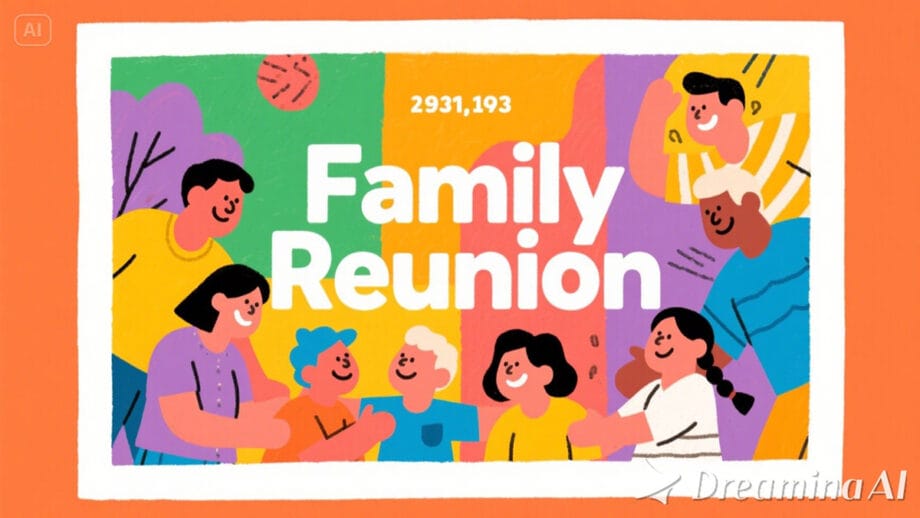
At this point, a photograph is no longer simply something that is viewed. A photograph is something that is shared. An old photograph is no longer simply something that is looked at. An old photograph is something that is shared.
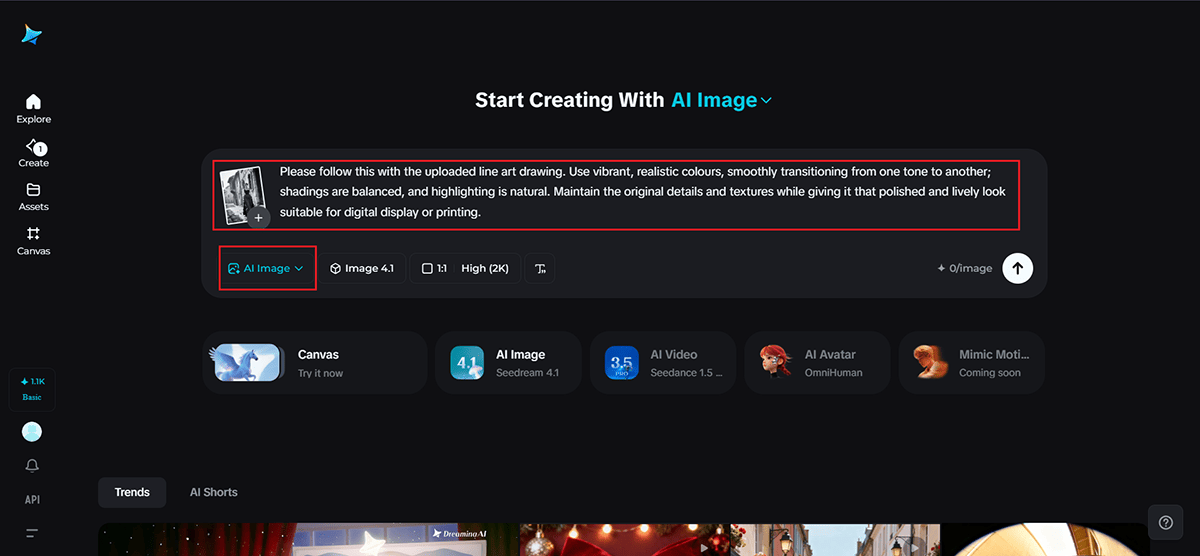
Step 1: Upload Your Line Art and Provide a Clear Prompt
After you have logged in to your Dreamina account, you will proceed to the AI Image website by clicking the plus sign, where you will upload your black-and-white image. Once your image has been displayed, you will write the prompt describing how you wish the colors to look.
Example: Please follow this with the uploaded line art drawing. Use vibrant, realistic colors, smoothly transitioning from one tone to another; shadings are balanced, and highlighting is natural. Maintain the original details and textures while giving it that polished and lively look suitable for digital display or printing.
Step 2: Model Selection, Setting Output Configuration
Select Image 4.1 for smooth, consistent colorization that retains skin tones and textures in their natural look and feel. Select the aspect ratio and resolution to match your project, from a phone screen to a social feed to a printed album. Of course, you can also set a custom size if you’re preparing for something specific, then click Generate to let Dreamina create your colored versions.
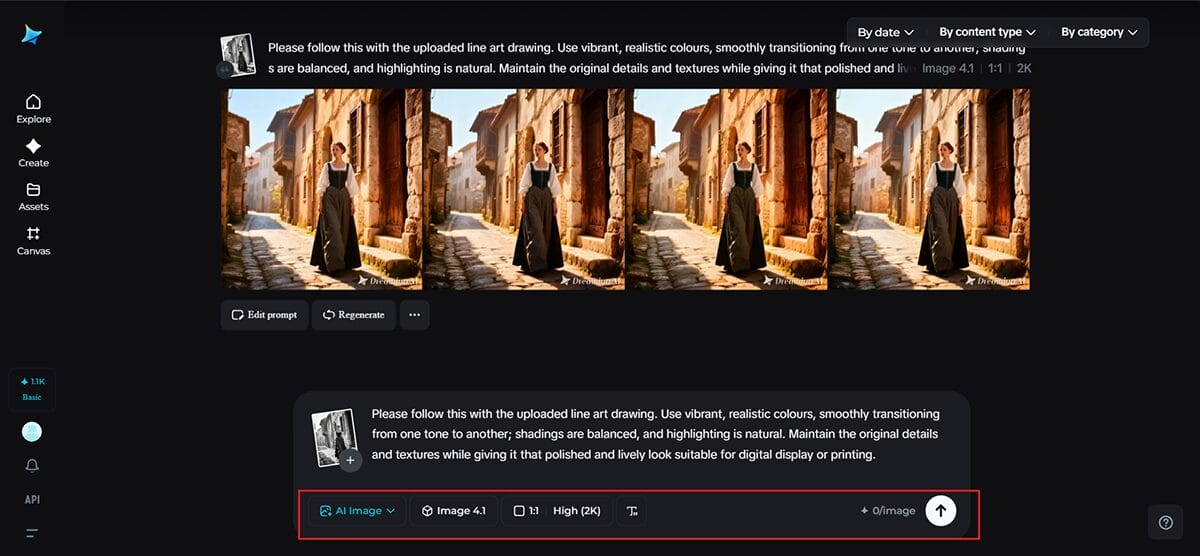
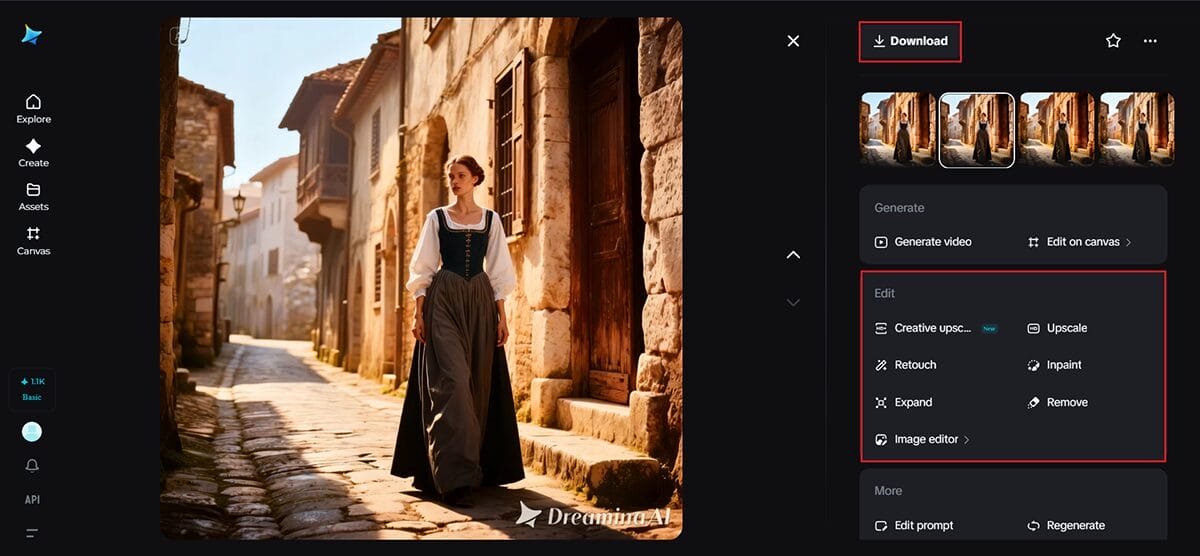
Step 3: Review, Refine, and Download
Browse through the images that Dreamina produces and see which ones are closer to the image that you had in your mind. To refine details, you can simply use the editing software tools on the right panel, either by refining small areas or making tone corrections if these need to be done. Once satisfied, click Download at the top to save your colorized photo and start using it in your projects.
Optimization of the Feeling of a Photo
However, once colorized, it is common for people to want to polish their images so that they look perfect on computer screens. A slight adjustment in brightness or warmth will cause faces to glow slightly or cause backgrounds to be more balanced. Using Dreamina’s photo enhancer on your already completed image is one of the best ways to make sure that your image looks crisp and clear without sacrificing the softness that is in classic photographs.
This stage is not about keeping the image fresh. This stage is about permitting the image to fit seamlessly into the modern digital age.
What People Notice are the Differences, the Things
When the photograph is colored, minute details come into focus:
- The warmth of someone’s eyes.
- Textures of garments and fabrics.
- Atmospheres from a room or a street.
Such details were always present; however, color adds a sense of feel.
Sharing and Storytelling with Colored Photos
Colorized photos can be very effective at storytelling. They are commonly employed here:
- Inheritance and inheritance patterns.
- Online photo albums.
- Social posts that call for comments and feedback from family members.
- Digital slideshows for birthdays, weddings, or marriages.
A picture can start conversations that will last for hours. Questions begin to arise, and people start to share stories to fill the space around the picture that is frozen in time.
Why Dreamina Fits Naturally into this Process
The goal of Dreamina is to feel like you’re being very creative, not technical. There’s no wrestling with navigation menus to figure out how to, say, draw eyes, because you simply tell it what you want, and it gives you what looks like it was done with care.
This ease makes experimenting easier. You can see what effect using different color schemes, softer lighting, or warmer colors might have on altering the emotional impact of your photograph. Something different each time gives you options, so you can choose the one that resonates with your memory of the event.
Bringing the Past into the Present
Colorizing black-and-white photographs is not about perfection; it’s about connection, seeming to bring a loved one closer, from a different era. It bridges generations in that quiet but powerful way.
With Dreamina, such bridges are not hard to build. A photo, which once sat in a box, can now be a vivid part of your digital life. Whether it is an album you want to make, a keepsake print, or something entirely new, Dreamina is there to help you bring the past forward with care, creativity, and a touch of modern magic.