Quick Summary
DeeVid Image-to-Video AI helps marketers and businesses quickly turn static images into polished video clips for ads, social media, and eCommerce. Its strengths lie in speed, ready-made templates, start-to-end frame control, and 1080p exports on paid plans. While the free tier is mainly for testing, and advanced editing may require other tools, DeeVid works best as a “generate, test, iterate” solution for teams that need fast, scalable creative variations without heavy editing effort.
Introduction
Ever wish you could turn one great product photo into a scroll-stopping clip without fussing with an editor? That is the promise of image-to-video AI. DeeVid AI pushes this promise by offering ready-to-use templates, start-to-end frame video controls, and rapid exports for social media and ads.
In this review, I share results from testing DeeVid Image-to-Video AI. My tests reveal both the tool’s strengths and its occasional hurdles when handling business workflows. Read on.
What DeeVid Image-to-Video AI Can Do for You?
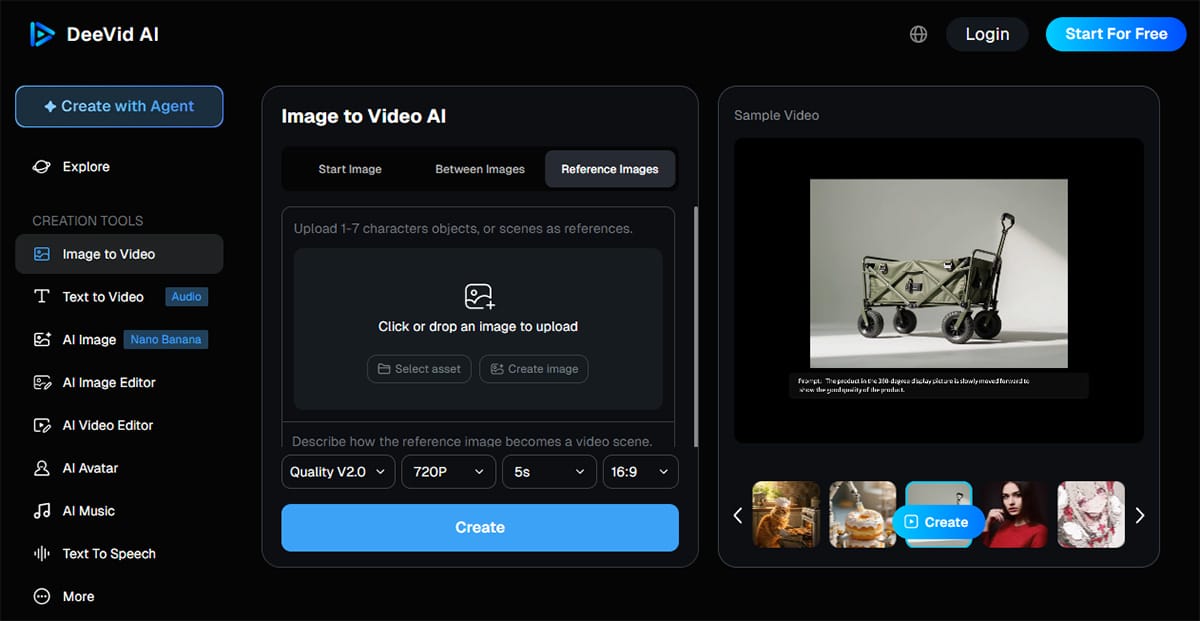
If your team has quality photos, DeeVid’s strongest suit is its speed. You can instantly turn product shots, portraits, or campaign stills into brief clips with lively motion, smooth scene transitions, and style shifts.
I ran practical tests, and the tool handled both single-image motion and multi-image video projects with minimal setup. My background in digital marketing shows that an interface designed for quick iterations works wonders for social media campaigns.
One mode I use repeatedly is start-to-end frame video. Instead of leaving camera motion to chance, you set the opening and final frame while DeeVid AI fills the gap. This method produces neat before-and-after transitions for product marketing and landing-page hero loops.
DeeVid AI employs several video models. Its iOS app listing reveals models like Veo3, Kling, and Sora. This lets you switch styles without juggling multiple tools. For proof of quality, the same iOS listing shows a 4.6 out of 5 rating based on 161 ratings as of February 6, 2026. I confirmed these details by comparing information on the official app page.
Where DeeVid fits best in a business workflow:
- Paid social testing: Generate 5 to 10 hook variations fast, then only polish the winners.
- E-commerce creatives: Animate a hero image into a short demo loop for PDPs and ads.
- Memory videos and tribute videos: Add gentle motion, captions, and music with minimal editing.
- UGC-style ads: Use an AI avatar and AI lip sync for quick spokesperson clips when you can’t film.
- Brand refreshes: Use video style transfer to create seasonal looks from the same core assets.
Step-by-Step Guide: How to Use DeeVid Image-to-Video AI?
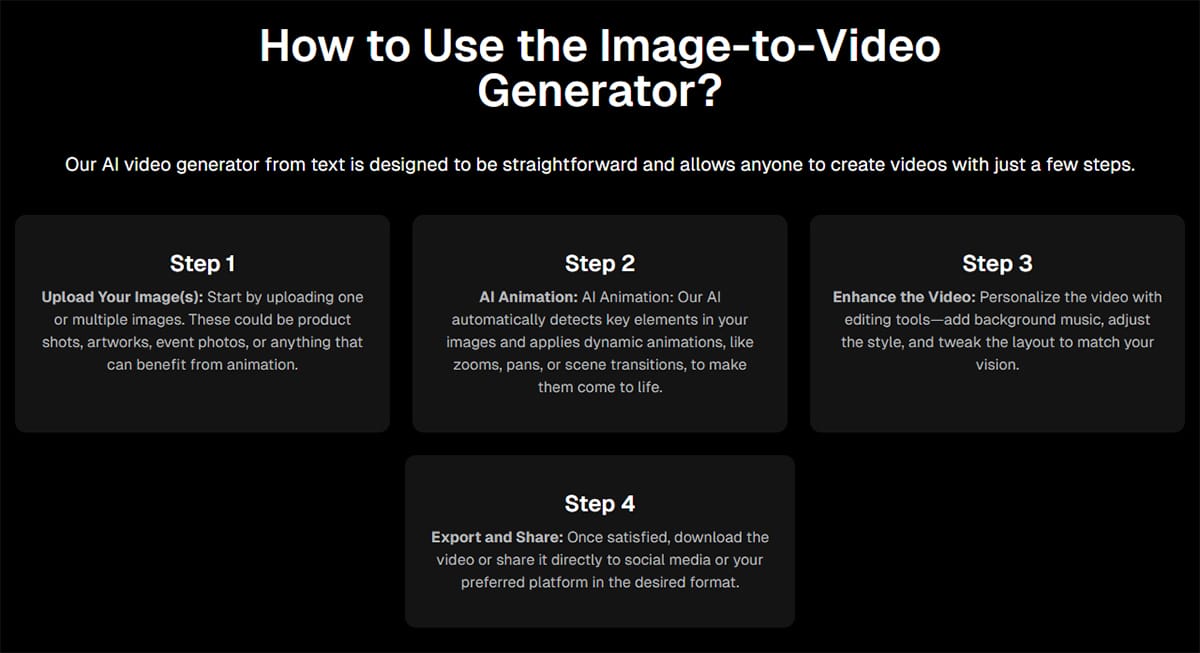
If you want a quick way to craft an ad or social post, use DeeVid AI as a “generate, judge, iterate” tool. Making a few short attempts wins over spending ages perfecting one prompt.
- Prep your inputs for cleaner motion: Choose sharp images with clear subject edges and steady lighting. DeeVid AI’s blog advises that transitions stay smoother when images align in angle and brightness. You can tweak images beforehand for better results.
- Upload images (keep file size reasonable): A DeeVid tutorial suggests keeping each image under 30 MB to avoid upload hiccups and slow processing. Resizing images prior to upload can save time.
- Pick your mode: Use single-image motion for quick reels, multi-image video for slideshows that show real transitions, or start-to-end frame video when you want a deliberate opening and closing. Each mode brings its own creative twist.
- Write prompts that “direct” motion: Keep text prompts short and clear. Use simple camera terms like “slow push-in” or “gentle parallax.” For example, a prompt such as “soft zoom in” may yield a subtle motion effect. If unusual movement occurs, ease off on active words and adjust your style in small steps.
- Generate multiple versions before you edit: DeeVid AI’s 2026 guidelines recommend creating 3 to 6 variants before selecting the most stable clip. Experimenting with several options often leads to the best final edit.
- Finish like a marketer: Add your caption or on-screen offer, choose a fitting background track, and export at the highest resolution available (Lite: 720P, Pro and Premium: 1080P). Reserve your final exports for paid placements and keep draft versions for internal review.
Pricing Options of DeeVid AI
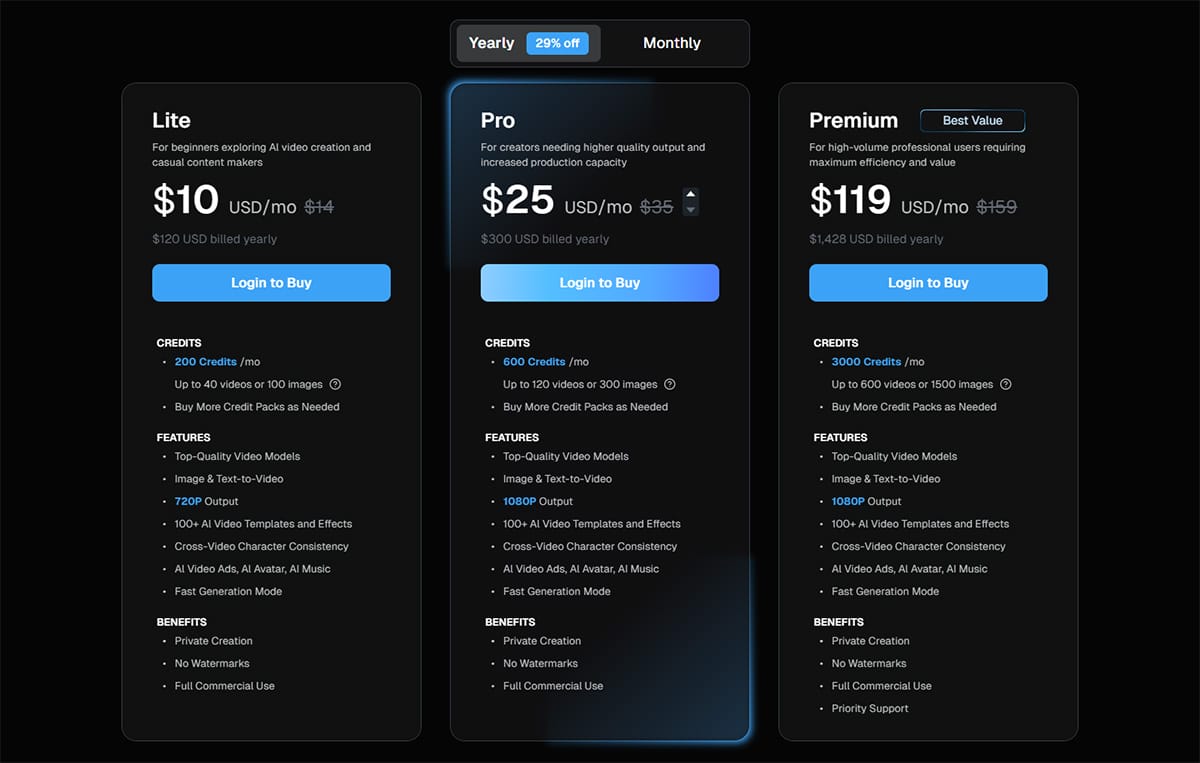
DeeVid AI uses a credit-based pricing model. The cost for a business depends on how many versions you create per deliverable. When A/B testing creatives, select a plan that allows you to experiment freely without fretting over every click.
| Plan | Costs (Monthly & Yearly) | Credits (Output Limits) | Notes |
| Free Trial | Free | 20 one-time credits (About four videos, Watermarked) | DeeVid states new users get 20 free credits at signup, good for roughly four short videos. |
| Lite | $14/month, $120/year | 200/month (Up to 40 videos or 100 images, 720P) | No watermarks and commercial use are listed on paid plans. |
| Pro | $35/month, $300/year | 600/month (Up to 120 videos or 300 images, 1080P) | Best fit for most small teams making weekly AI ad videos and social media variants. |
| Premium | $159/month, $1,428/year | 3,000/month (Up to 600 videos or 1,500 images, 1080P) | Includes priority support and the highest monthly credit allotment for agencies. |
Other notes:
- Credits: DeeVid explains credits as consumption units you can spend across video, image, and audio generation, depending on what you create.
- Watermarks: Free outputs are watermarked. DeeVid states paid membership exports have no watermarks.
- Commercial use: DeeVid’s FAQ states you can use AI-generated videos for commercial purposes, subject to its terms.
- Platforms: DeeVid lists availability on Windows, macOS, iOS, Android, and web browsers using the same account.
- Support: Lite and Pro list standard support. Premium lists priority support for faster responses.
- Business fit: Solo creators often test with Lite. Most businesses start on Pro for 1080P. Agencies with volume and tight turnarounds scale with Premium.
Pros of DeeVid Image-to-Video AI

This list highlights the main strengths of businesses using DeeVid AI.
- Fast output for marketing teams: Turn product photos into clips quickly, which helps you ship more variations for social media and AI ad video tests.
- 1080P on business-friendly tiers: DeeVid’s plan page lists 1080P output on Pro and Premium, ensuring your creatives stay crisp for paid placements.
- Cross-video character consistency: A recurring avatar or consistent “brand character” improves campaign coherence.
- Lots of templates and effects: DeeVid lists 100+ AI video templates and effects, with its iOS listing noting a growing library that includes the AI 360° microwave effect.
- Commercial-ready exports on paid plans: Paid memberships offer exports without watermarks and support commercial use, so you publish without extra steps.
- Works across devices: Use the same account on desktop and mobile, which lets you brainstorm on a phone and export on a laptop.
Cons of DeeVid Image-to-Video AI

As I tested DeeVid AI, certain limits may impact results:
- Free tier is not publish-ready: Watermarks hinder brand visibility, so the free trial is best for evaluating motion quality and workflows.
- Lip sync still needs scrutiny: AI lip sync works for rapid ads, yet slower talking-head videos might expose timing issues that require extra adjustments.
- Advanced needs may require another tool: For timeline editing, keyframes, or frame-by-frame cleanup, a traditional editor might be necessary.
Other Use Cases of DeeVid AI
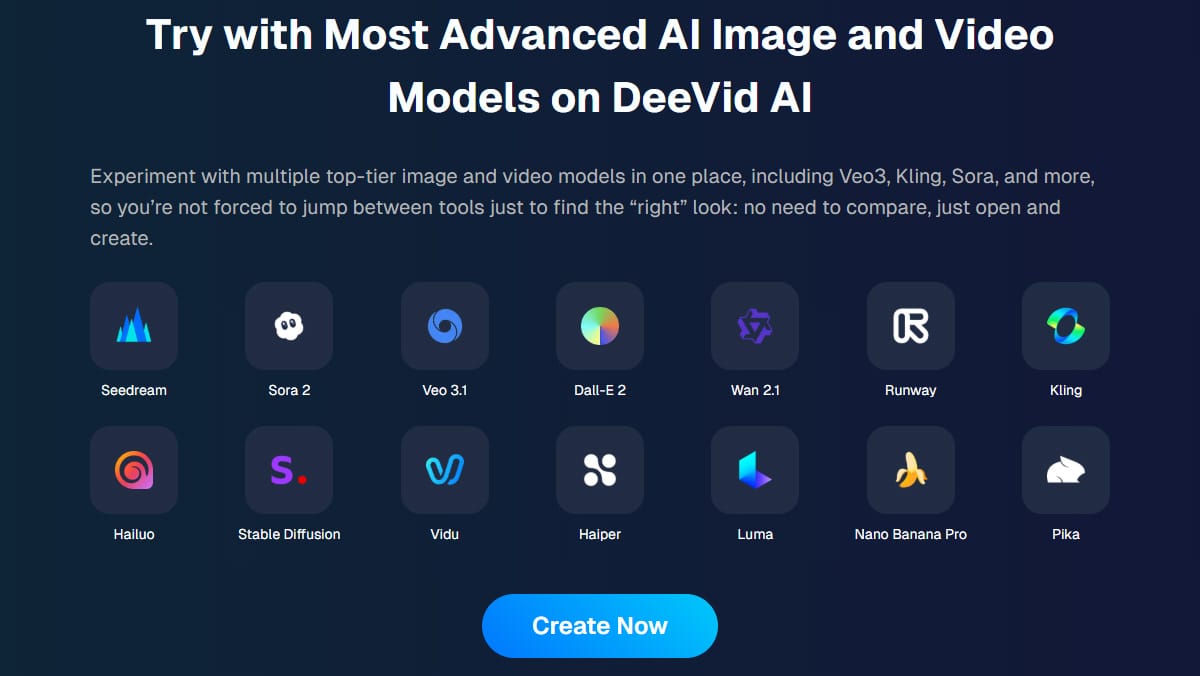
I tested DeeVid AI and produced videos, voiceovers, music, and images all in one day. Tie each use case to a real deliverable – like an ad variant, an email header clip, or an onboarding snippet – to get the most out of the tool.
Marketing and growth use cases
- Text-to-video AI for quick concept ads, useful when testing various creative angles before a shoot.
- Image-to-video AI for product photos, turning a static hero image into a short loop with clean scene transitions.
- Video-to-video AI for video customization, ideal for achieving seasonal styles from existing footage.
- AI ad video templates for rapid variation testing when you need multiple hooks for paid social campaigns.
Brand, community, and internal content
- AI music and simple background tracks for short promos, recap clips, and branded reels.
- Text-to-speech voiceovers for product demos, explainers, and training materials.
- Memory videos and tribute videos with gentle motion and captions work well for community posts and brand storytelling.
FAQs

1. What is DeeVid Image-to-Video AI?
DeeVid Image-to-Video AI is a tool and video generator that uses artificial intelligence to convert static images into dynamic motion. It accepts text prompts and images as inputs and generates videos.
2. What kinds of videos can it make from static images?
You can create multi-image video sequences, start-to-end frame video clips, and memory videos for social media. It delivers professional-grade, high-quality 1080p video exports for product marketing and visual storytelling.
3. Can I use text-to-video or text prompts with DeeVid?
Yes, DeeVid AI supports text-to-video AI workflows and clear, concise text prompts. It also offers video style transfer and lets you adjust clips with video-to-video AI tools.
4. Does it offer AI avatar and lip sync features?
Yes, DeeVid AI creates a personalized AI avatar and processes AI lip sync so your digital actor stays in sync. The tool also delivers creative effects like the AI 360° microwave effect for standout scenes.
5. Is DeeVid good for marketers and ads?
Yes, DeeVid AI works well for producing AI ad videos, social media posts, and viral content quickly. Marketers get visual storytelling tools, creative effects, and high-quality videos that boost product marketing.
Conclusion
If your team needs fast motion from photos, DeeVid proves to be a smart image-to-video AI option for social and ad creative. You get high-quality 1080p video exports on Pro and Premium plans, along with templates, smooth scene transitions, and versatile inputs like text-to-video and video-to-video.
Start with the free trial and upgrade once the motion quality and credit pacing fit your campaign needs.